trustfinance-logo

TrustFinance

  • new

  • Blog

US

    • Voting
    • Awards
    • Rewardsnew
  • industry
    • Regulations
    • Comparison
  • Blog
    • About Us
    • Testimonial
    • Legal
    • Why TrustFinance
    • How TrustFinance works
    • Report
Forex
Crypto
Stock
Financial
Media
Technology
TrustFinance logo

TrustFinance

The most trusted platform

Office: 63 Chulia Street, OCBC Centre East, #15-01, Singapore, 049514
Main contacts:
[email protected]-Technical supports and inquiries
[email protected]-Free online reputation consulting services
[email protected]-Sales inquiries
Business Hours: Mon. - Fri. (11.00-19.00)
Time zone (Singapore)

Features

  • Home
  • Voting
  • Awards
  • Rewardsnew
  • Blog
  • Regulations
  • Comparison

Industry

  • Crypto
  • Financial
  • Forex
  • Media
  • Stock
  • Technology

For Business

  • Business Home
  • Request Demo
  • Solutions
  • Plans & Pricing
  • Events

Our Company

  • About Us
  • Testimonial
  • How TrustFinance Works
  • Why TrustFinance
  • Legal
  • Report
  • Sitemap
DMCA.com Protection StatusGDPR Audit Checklist
Copyright © TrustFinance 2022 | V.2.0

TrustFinance is trustworthy and accurate information you can rely on. If you are looking for financial business information, this is the place for you. All-in-One source for financial business information. Our priority is our reliability.

Features
  • Home
  • Voting
  • Awards
  • Rewardsnew
  • Blog
  • Regulations
  • Comparison
Industry
  • Crypto
  • Financial
  • Forex
  • Media
  • Stock
  • Technology
For Business
  • Business Home
  • Request Demo
  • Solutions
  • Plans & Pricing
  • Events
Our Company
  • About Us
  • Testimonial
  • How TrustFinance Works
  • Why TrustFinance
  • Legal
  • Report
  • Sitemap

Community

Office: 63 Chulia Street, OCBC Centre East, #15-01, Singapore, 049514
Main contacts:
[email protected]-Technical supports and inquiries
[email protected]-Free online reputation consulting services
[email protected]-Sales inquiries
Business Hours: Mon. - Fri. (11.00-19.00)
Time zone (Singapore)
DMCA.com Protection StatusGDPR Audit Checklist
Copyright © TrustFinance 2022 | V.2.0

TrustFinance is trustworthy and accurate information you can rely on. If you are looking for financial business information, this is the place for you. All-in-One source for financial business information. Our priority is our reliability.

Home
navigate next

Blog

navigate next

Guides & Tutorials

navigate next

How to Use TrustFinance Developer Integrations

How to Use TrustFinance Developer Integrations

User profile image

TrustFinance

Sep 26, 2025

4 min read

13

How to Use TrustFinance Developer Integrations

For businesses with custom systems, Developer Integrations provide the most flexibility. With APIs, Webhooks, and Zapier, you can connect TrustFinance reviews and invitations directly into your apps, CRMs, or workflows.

In this guide, we’ll cover:

  • APIs (Get Reviews / Invite Review)
  • Webhooks
  • Zapier

Before starting, make sure your company is verified on TrustFinance so integrations connect securely to your official profile.

APIs

APIs allow you to access reviews and send invitations programmatically.

Get Recent Review

Retrieve reviews submitted in the last 28 days.

  • Endpoint: GET /third-party/recent-review
  • Headers: API key + API secret (unique per company)
  • Response: Total reviews, review details (title, description, score, created date, user info)
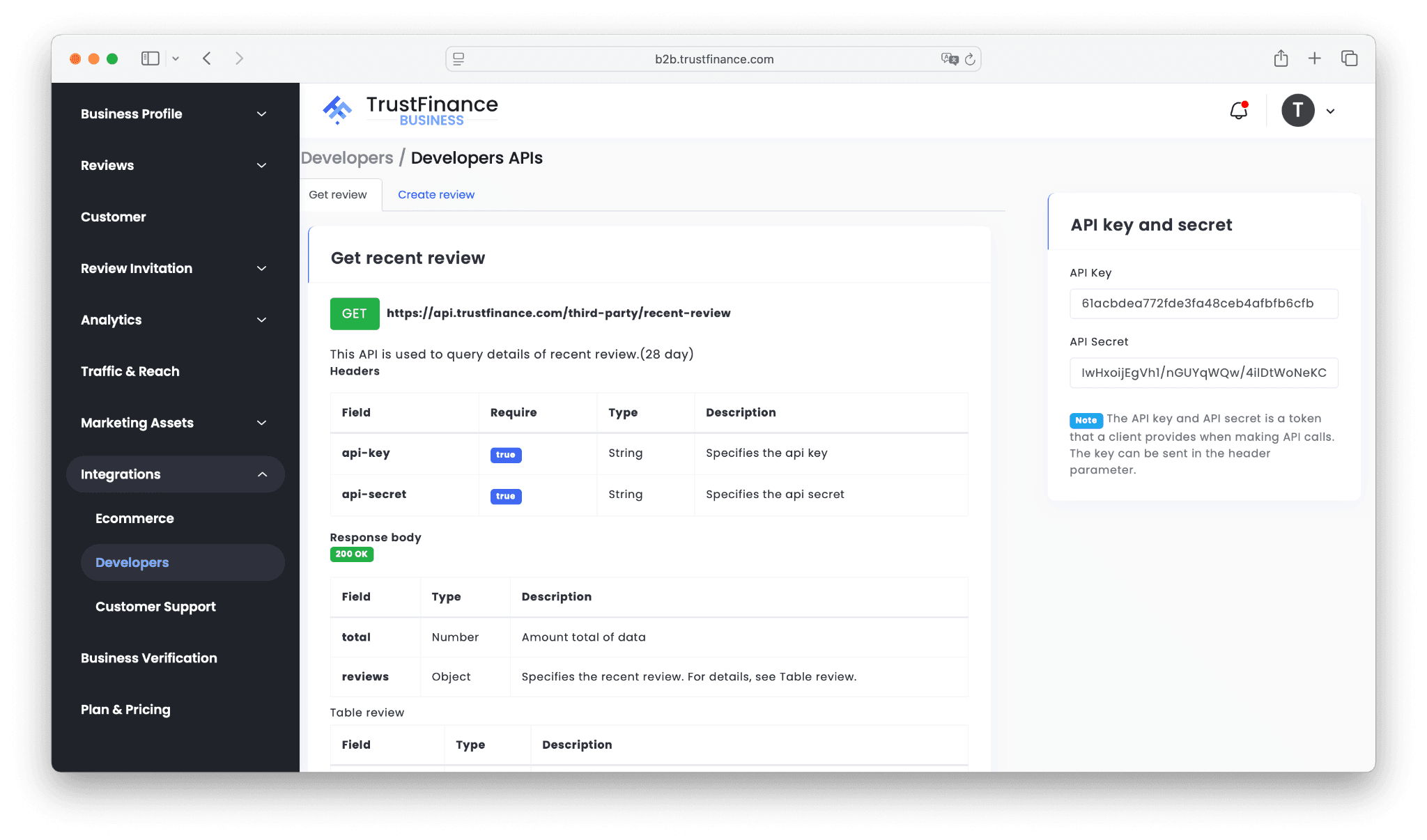
image.png

Create Invite Review

Send review invitations directly from your system.

  • Endpoint: POST /third-party/invite-review
  • Headers: API key + API secret
  • Body: Customer email, first name, last name
  • Response: Reference code confirming the invitation
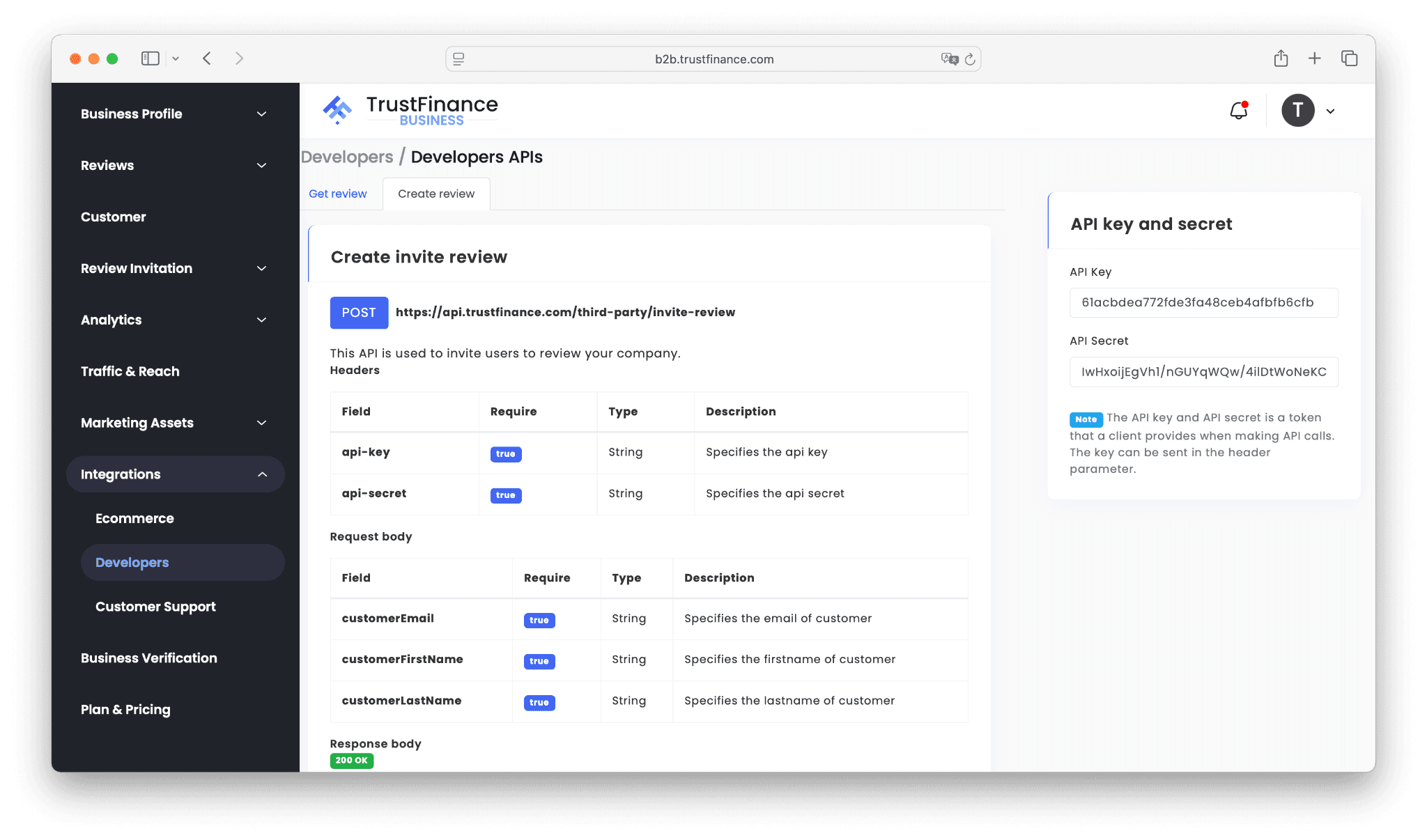
image.png

💡 Tip: Automate review requests after purchases, bookings, or sign-ups. For practical tips, see How to Use the Review Invitation Feature to Collect More Reviews.

Webhooks

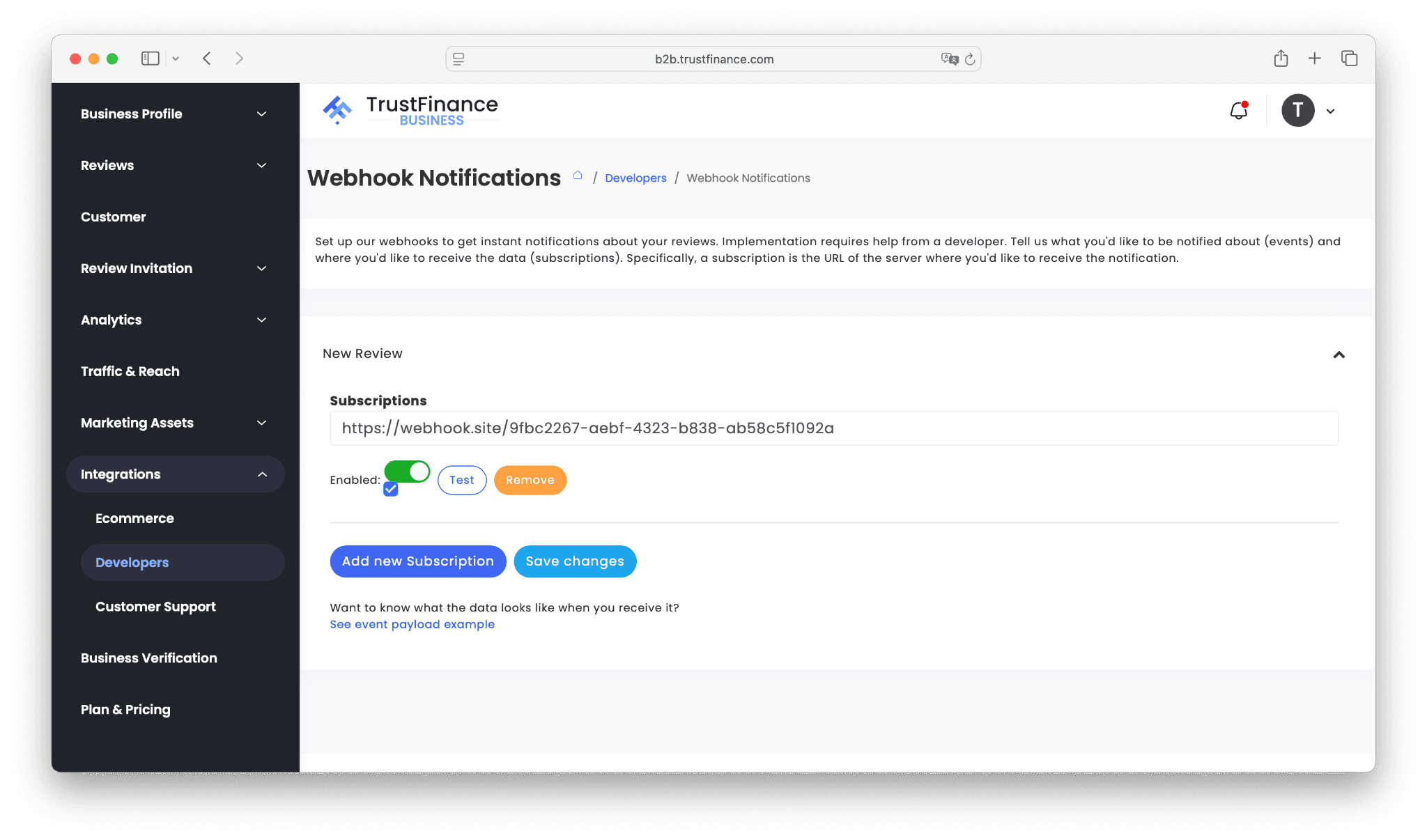
Webhooks push notifications to your system in real time whenever new reviews are submitted.

Setup Steps

  1. Go to Integrations > Developers > Webhooks in your dashboard.
  2. Add your subscription URL (your endpoint).
  3. Enable the webhook and run a test.
  4. Save changes.
image.png

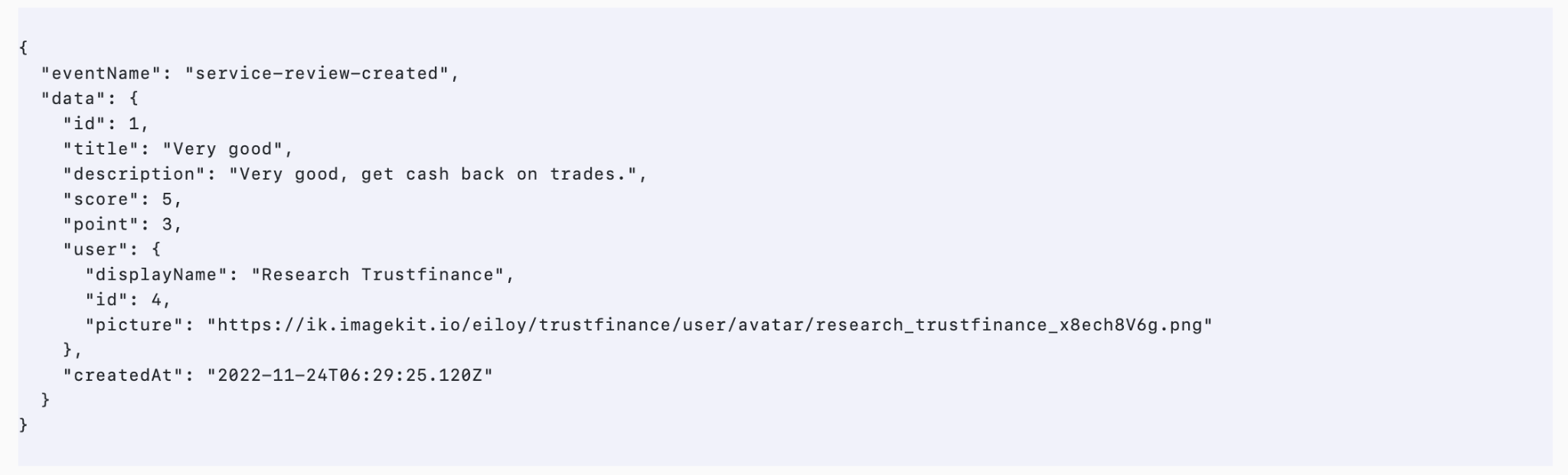
Example Payload

image.png
  • Event: service-review-created
  • Data: Review ID, title, description, score, created date, user details

Use Cases

  • Send instant alerts to Slack or Teams
  • Sync reviews with your CRM
  • Trigger workflows for negative feedback

Zapier

Zapier lets you connect TrustFinance to over 5,000 apps — no coding required.

How It Works

  • Trigger: An event in another app (e.g., new Mailchimp subscriber, new Salesforce contact).
  • Action: TrustFinance sends a review invitation automatically.
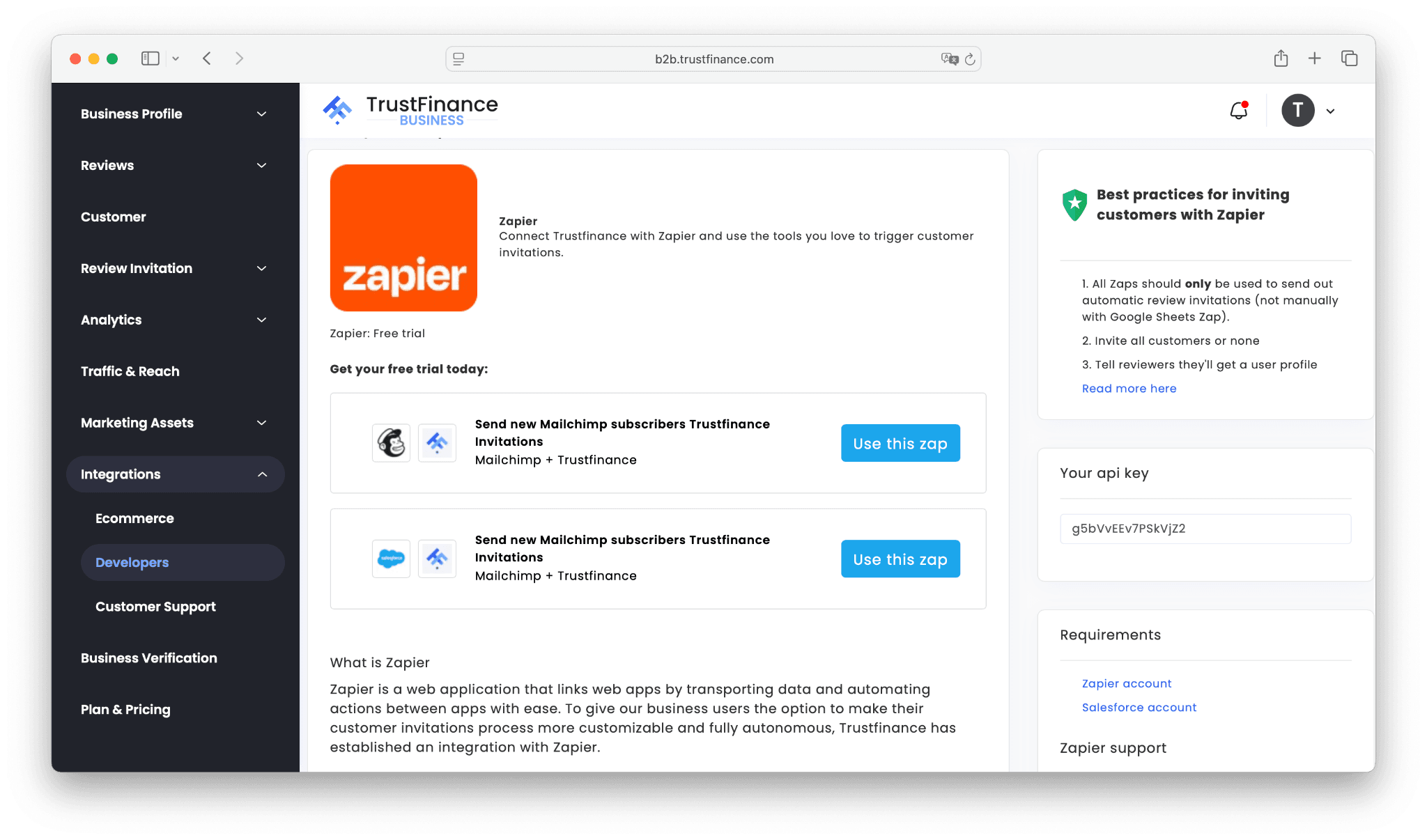
image.png

Popular Templates

  • Mailchimp + TrustFinance – invite new subscribers
  • Salesforce + TrustFinance – invite new Salesforce contacts

Setup Steps

  1. Open Integrations > Developers > Zapier in your dashboard.
  2. Click Use this Zap on the template you want.
  3. Log in (or sign up) to Zapier.
  4. Select the trigger app (e.g., Mailchimp).
  5. Select TrustFinance as the action app.
  6. Authorize with your API key.
  7. Test and activate.
image.png

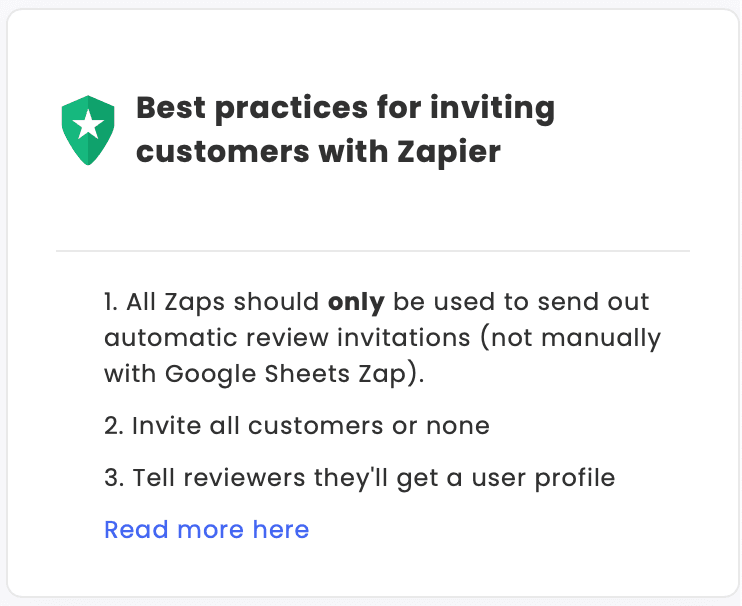
Best Practices

  • Use Zaps only for automatic invitations (not manual uploads).
  • Invite all customers (avoid cherry-picking).
  • Tell customers they’ll create a user profile when reviewing.

💡 Tip: Zapier is perfect for non-technical teams. Pair it with How to Maximize Your TrustScore on TrustFinance to ensure steady review growth.

Final Thoughts

Developer integrations give you full control over how TrustFinance connects with your systems.

  • Use APIs to fetch reviews or send invitations.
  • Use Webhooks for instant review alerts.
  • Use Zapier to connect with tools like Mailchimp, Salesforce, or Slack.

Next steps:

  • Ecommerce Integrations if you use WordPress, Salesforce, or JavaScript
  • Customer Support Integrations if you want to connect reviews with Zendesk

For the complete overview, check the TrustFinance for Business Guide.


Written by

User profile image

TrustFinance

TrustFinance helps financial companies build credibility and traders make safer choices through verified profiles, authentic reviews, and research-driven insights.

Tags:


Best pick of the Week


Best pick of the Week


Related Articles

How to Connect TrustFinance with Customer Support Platforms.png

26 Sep 2025

How to Connect TrustFinance with Customer Support Platforms

How to Integrate TrustFinance with Your Ecommerce Platform.png

26 Sep 2025

How to Integrate TrustFinance with Your Ecommerce Platform

How to Use Integrations  on TrustFinance.png

26 Sep 2025

How to Use Integrations on TrustFinance

How to use marketing assets.png

25 Sep 2025

How to Access and Use Marketing Assets from TrustFinance

How to Maximize Your TrustScore on TrustFinance.png

23 Sep 2025

How to Maximize Your TrustScore on TrustFinance

how to verify business.png

23 Sep 2025

How to Verify Your Business on TrustFinance

How to Use Analytics to Track Reviews and TrustScore Growth.png

23 Sep 2025

How to Use Analytics to Track Reviews and TrustScore Growth

How to Use the Review Invitation Feature  to Collect More Reviews.png

23 Sep 2025

How to Use the Review Invitation Feature to Collect More Reviews

Transforming CX into Business Growth – Get Your Free White Paper

Top 10 Cryptocurrencies Worth Investing in 2024-2025 Latest Update

The 5 Levels of Forex Broker License

Free 2025 Broker Reputation Report: Insights from Real Trader Reviews

Get a Free SMC E-Book: The Ultimate Trading Strategy for 2025! Worth $280

Transforming CX into Business Growth – Get Your Free White Paper

Top 10 Cryptocurrencies Worth Investing in 2024-2025 Latest Update

The 5 Levels of Forex Broker License

Free 2025 Broker Reputation Report: Insights from Real Trader Reviews

Get a Free SMC E-Book: The Ultimate Trading Strategy for 2025! Worth $280