Loading
How to Connect TrustFinance with Customer Support Platforms

TrustFinance
Sep 26, 2025
2 min read
167

Managing reviews alongside customer service is key to building trust. With the Customer Support integration, you can connect TrustFinance directly to Zendesk so your team can handle feedback without leaving their support dashboard.
In this guide, we’ll show you how to set up the Zendesk integration.
Zendesk Integration
The TrustFinance + Zendesk integration lets you:
- Manage and reply to reviews directly inside Zendesk
- Streamline customer feedback and support tickets in one place
- Avoid switching between multiple platforms
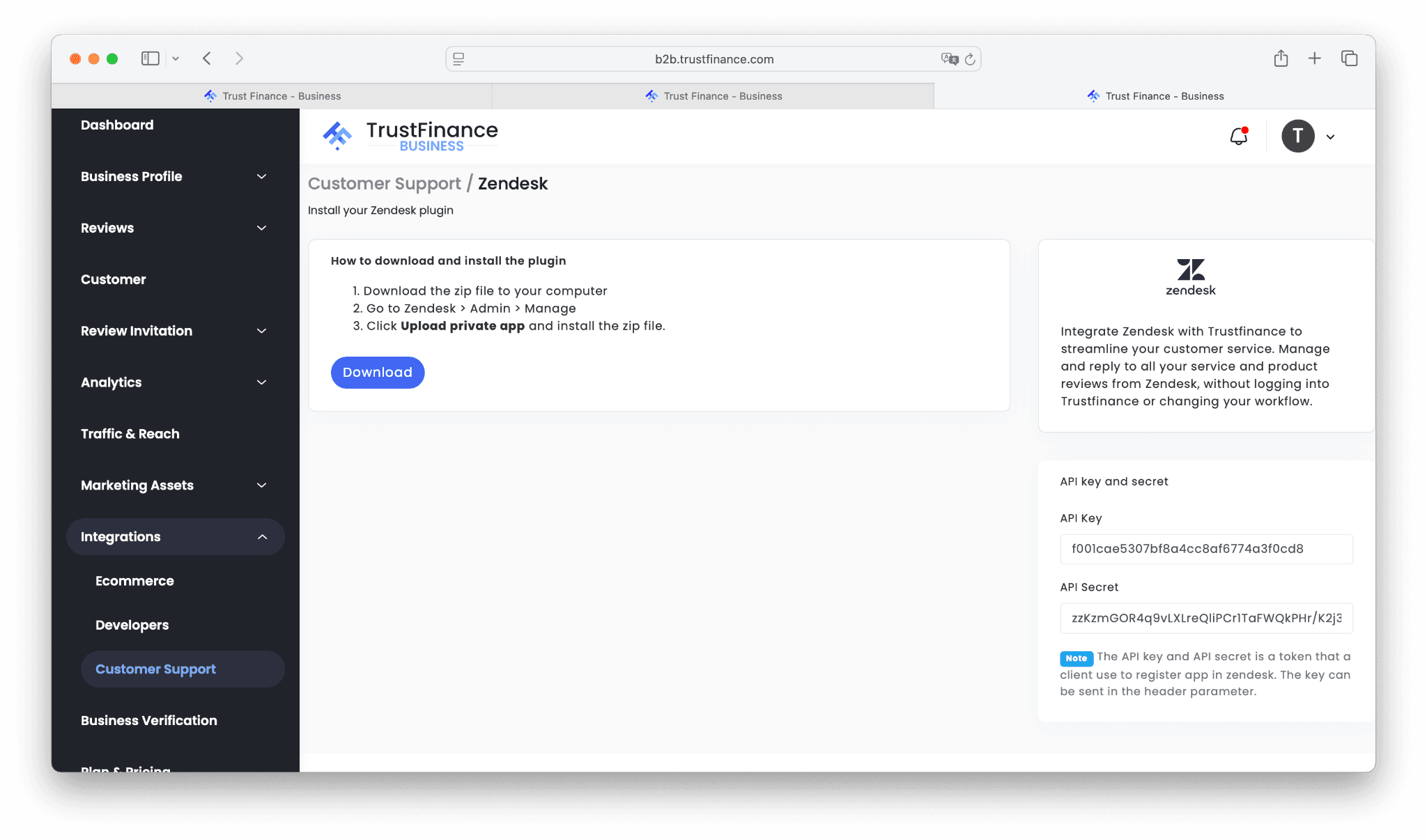
How to Install
- In your TrustFinance Business Dashboard, go to Integrations > Customer Support > Zendesk.
- Click Download to get the plugin .zip file.
- In Zendesk Admin, navigate to Manage > Upload private app.
- Upload and install the .zip file.
API Keys
During setup, you’ll need your API key and API secret. These are generated inside your TrustFinance dashboard.
⚠️ Note: Each company has unique API credentials. Do not share or reuse sample values — always use the keys from your own dashboard.
Benefits
- Centralize reviews and tickets in one place
- Respond to reviews faster
- Align customer service actions with real-time customer sentiment
💡 Tip: Once Zendesk is connected, use How to Use Analytics to Track Reviews and TrustScore Growth to measure how your support efforts impact reputation.
Final Thoughts
Connecting TrustFinance with Zendesk empowers your customer support team to act on reviews instantly, without leaving their workflow. This saves time, improves response rates, and strengthens customer trust.
Next steps:
- Ecommerce Integrations if you run WordPress, Salesforce, or a custom store
- Developer Integrations if you want APIs, Webhooks, or Zapier automation
For the full overview, check out the TrustFinance for Business Guide.
Written by
TrustFinance
TrustFinance helps financial companies build credibility and traders make safer choices through verified profiles, authentic reviews, and research-driven insights.
Tags:
Best pick of the Week
Related Articles


26 Sep 2025
How to Use Integrations on TrustFinance


23 Sep 2025
How to Verify Your Business on TrustFinance
